LUA is one of the most commonly used programming language in the world of game design. It is a simple, interpreted language that let you communicate with C functions. It simplify the job of game designers and remove the complicated memory management that comes with lower level coding languages like C/C++.
Therefore in game-hacking, it is extremely crucial to get your hand on Lua’s programming language. However, you cannot just run your code because that would expose internal game’s APIs to malicious actors such as cheaters. And that is exactly what we will do today.

The beginning:
One of the greatest tool and the simplest to use in any sort of static reverse engineering is the string enumeration. I will be using x64dbg today as my debugger and disassembler. After loading up the binary and simply search for All String in all modules will result in a string dump of the entire binary. First step is to filter for any “Lua” string in the binary.
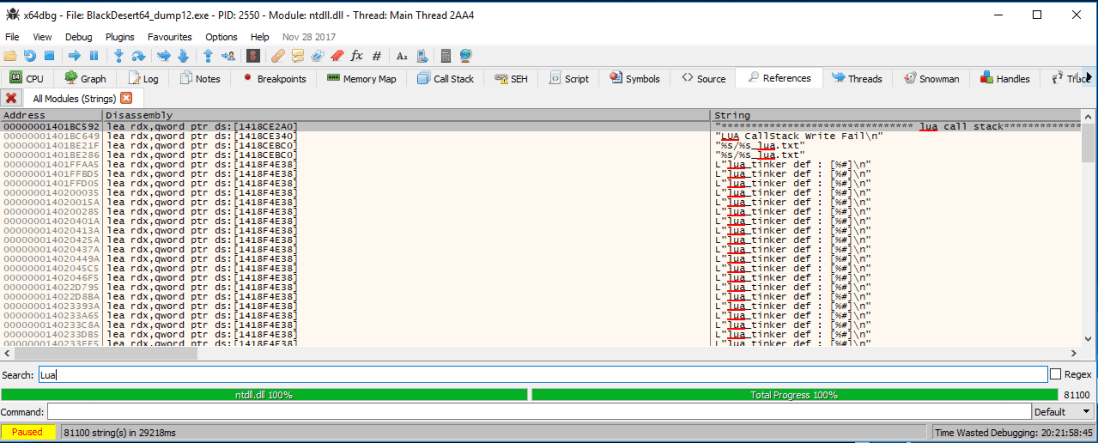
One of the most recurring string is L"lua_tinker def : [%#]\n" . The L in the front signify that this is a wide string but overall it does not tell us much. Until we do a simple google search for “lua_tinker def”.


At this point, we can verify that this is the source code that the game uses. I have no clue why it is online, or if this is the original creator but the source code is available to us.

If you know any thing about lua programming, there are a few functions that will first pop up. These are dostring or dofile. Here is the description of the function from the lua’s website:
dofile (filename)
This function receives a file name, opens it and executes its contents as a Lua chunk, or as pre-compiled chunks. When called without arguments, it executes the contents of the standard input. It returns 1 if there are no errors, nil otherwise. It issues an error when called with a non string argument.
dostring (string)
This function executes a given string as a Lua chunk. It returns 1 if there are no errors, nil otherwise.
Basically, these are the two functions that will give us the ability to execute code as well as what the game is using to execute lua code. Let’s look for that in the lua tinker’s source code.

This is exactly all we need to know. DoString is actually returning dobuffer. Do buffer takes in three arguments, Lua_State *, const char * and size_t. Reading up the documentation, we will learn that Lua_State * is a pointer to the lua’s stack environment set up. It is required on all lua’s function and we will need it to execute functions inside the correct environment that will affect the game. const char* is a char pointer the ascii text that we want to execute, ie. “dosomething()”. Lastly, size_t is just an unsigned integer which we learned from the screenshot is just the .size() function applied on the text you want to execute, basically the length of the executing string.
Lastly, we also see an ascii text being shown which says “lua_tinker::dobuffer()”. What if…we search for this in the string dump?


This get decompile by ida into:

Wait…a sec… That looks exactly like
Let’s do some renaming…

It looks like we found our dostring/dobuffer! The rest is to hook it, extract the Lua_State pointer, store it for future use and then call the function whenever we need to execute something.
typedef INT(CALLBACK * _DoString)(lua_State *L, CONST CHAR *s, size_t size);
o_DoString(s_LuaState, Code.c_str(), Code.length());
As this is not a tutorial on how to hook, i will skip all of that and go to the resulting function:
INT(CALLBACK h_Dostring)(lua_State *L, CONST CHAR *s, size_t size)
{if (!(s[0] == ‘\0’))
{
printf(“[LUA] – Exec: %s\n”, s);
}return o_DoString(L, s, size);
}
which will simply print out every function that the game’s call through dostring/dobuffer. Hence the result:
Next time, on how to hook functions and detour it to your own!

 Zer0C00lSecurity