It been brief since I’ve been here writing on WordPress but I’ve decided to move to Medium where there is a bit more flexibility in what I can do. Please continue to support my contents and I really appreciate all that read my blog!
I’ve just written a new blog post regarding Excel 4.0 Macro, please check it out!
Following up from the previous post, which ended up with a 4/25 detection rate – one that I would say decent but not perfect. Today, we will be applying a few extra techniques that hopefully will further help us with the detection, and that is encryption.
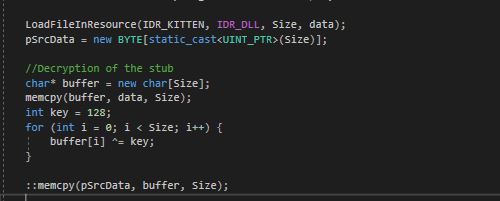
For now, we will be implementing a simple XOR encryption on our Mimikatz payload. As you can see from my previous post, we are currently importing mimikatz.dll into our injector as a resource, and then read that resource byte code into memory and inject it into notepad.exe. While this gave us exceptionally good result on dropping a 17/25 into a 4/25 – we still have the exact Mimikatz.dll binary sitting in our injector. Therefore, this post will be about how I encrypt the Mimikatz.dll binary with XOR and then decrypt it on run time as the injector is running. This will result in Anti Viruses not being able to detect our binary as it sits on Disk due to it being encrypted.
This is our encryption file. It just open the executable file, in our case mimikatz.dll and just XOR the entire file byte by byte. It then write it back out as mimikatz_hidden.dll.
Notice that the EncryptExecutable is your typical XOR function, nothing too special and it is the heart of the program. Same, applying the XOR function to our resource after we load it with the same key will work the same way due to how XOR functionality work.
Now, let’s compile it and see what is our new result.
1/25, wow. So this is actually a reoccurring theme in the malware/cryptor world. Eset NOD32 somehow, always is the only one that detects any sort of encryption. Apparently, Eset32 is doing something that no one else does, but given Eset is not a very well known-well used AV – we can call this a win for now. I will go deeper into reversing Eset32 and see what they are detecting our Mimikatz by. For now, I am happy with a 1/25. Thanks a lot for reading.
So, finally I got some time to write a blog post about Security and pentesting. I thought to myself, it would be really cool to implement some of the functionalities that cheat developers use into malware/pentest scenarios. In many aspects, game cheat development is leaps and bounds more advanced than the current techniques we are using as pentester. In memory execution? Powershell? Reflective DLL Injection? Heh. To combat kernel level Anti-Cheat like EAC and BE, game cheat developers has been done with memory execution and reflective dll loading and moved into manualmapping, kernel driver, and some even gone as far as bootkit/hypervisor mode. However, today let’s focus on some of the more easily understandable aspect of this, and it is DLL Injection. More specifically, Mimikatz dll injection.
Everyone is well aware of the most well-known lsass password dumping tool called Mimikatz. I won’t go too deep into it, but you can read more about it here on github. It reads lsass’ memory, looks for patterns and dump creds. Most well known tool, most well detected tool on any environment.
Downloaded from Github
Manually Compiled
I am more shocked that something you compiled yourself can have a higher detection rate but neither is wanted.
Here, at my consulting company – we modified Mimikatz ourselves and dubbed it PANDA and it achieved great results. The obfuscated mimikatz dubbed PANDA have gone on for a long time without any detection, until recently. And as obfuscation goes, it can only go so far… therefore I wanted to make it a bit of a challenge to see if we can make Mimikatz undetected, without obfuscation. My first thought, DLL Injection.
To compile Mimikatz as an dll, there is a few things we must modify. First, a setting to tell the compiler to compiles as an DLL as well as a different entrypoint. DLL entrypoint is default at DllMain() instead of main() or wmain() in this case due to wide-character setting. Dll also does not have its own console so we would have to AllocConsole() and uses freopen_s() to redirect the console output to the new console. Lastly, we can no longer pass arguments like we used to from command line using argv/argc, so we must use a different method for that such as std::wcin or C equivalence. For this demonstration, let’s just hardcode our commands.
After that is done, we can now compile our mimikatz.dll and use it as we wish. Let’s check our detection rate right now.
Down by 2, not a surprise given we did not modify much in term of how the binary is running. There is no difference beside a few instructions and a new entrypoint. However, that is good enough as a starter.
Next up, how are we going to make this execute? You surely won’t push this dll which is a 17/25 and an injector onto disk and execute it…will you? While it will work, it is kinda far from our goal of 0/25. Also, using an injector to inject Mimikatz manually is kind of a joke… so my next idea is to make a binary that is an injector, but also have Mimikatz’ bytecode in it so that it can injects the bytecode itself without requiring Mimikatz.dll to be on disk as its own file. For this to work, I will use an injector source code that I been using for quite some time and quite familiar with, that is also well documented – GuidedHacking Injector.
To be more specific, I will use its manualmapping functionality to get our dll to execute. For those who does not know what manualmapping is, it is basically doing everything LoadLibraryA does, manually, without actually using LoadLibraryA. This mean, write the bytecode to target process, inject the loader shellcode, relocate, fix imports, execute tls callbacks, and finally call DllMain. All of which are done usually by LoadLibraryA but because that is a very suspicious WINAPI functionality to call, we will avoid using it at all cost. There are much better writeup on manualmapping injection technique so I won’t go too deep into that.
I also made a video on how to embed the dll (mimikatz.dll) as a resource and compile it with the injector. You can watch it here.
Let’s skip all of that because I already covered it in the video, but what we will end up with is this:
I will use notepad.exe right now as an example but it would be fairly easy to change that into some other executable file. There are a few system processes that we can use (not lsass because lsass does not have its own windows). Or better, loop through every single processes and look for one that have a windows, same architecture as the compiled mimikatz (x86 can only inject into x86, and same for x64 > x64, there is no Heaven’s Gate implementation) and is running as with system/admin privilege. I dubbed this KittenClaw because, while claws does not inject – it does scratches you pretty well.
Here is KittenClaw in action:
It runs, manualmap Mimikatz into notepad.exe and does the 3 commands that I hardcoded. Let’s check its detection right now.
4/25, I expected better but then I realizes there is absolutely no obfuscation and all the strings that the binary comes with (mimikatz, gentilkiwi, etc) probably causes some of these detections. On top of that, it is a Heuristic detection for 2/4 so maybe we can go into some more on a later date. Overall, I think this is good progress for a few hours of work and we can totally work out this another time.
In the world of reverse engineering, there are many obstacles. One of those is anti-debugging techniques that was design to interrupt reversers’ ability to attach a debugger to an application. A debugger let us set break point and view the application stack frame, as well as registers’ value.
Today, we will look at the most simplest anti-debugging technique, isDebuggerPresent().
From the MSDN’s documentation, we can see that it is a winapi function that take in no argument and return a non-zero if it detects a debugger (TRUE) or a zero which means it does not detect any debugger (FALSE).
We will be using this code as an example:
int main()
{
if (IsDebuggerPresent())
{
std::cout << “Debugger is present\n”;
}
else
{
std::cout << “Business as usual, no debugger\n”;
}
//Pause the console so it does not close
std::cin.get();
return 0;
}
Which resulted in this when run normally:
Normal operation
However, running it under a debugger such as x64dbg, you will get a whooping:
Debugger Detected
And while we could use x64/32dbg built in anti-anti-debugger with the command, Hide, that wouldn’t be very interesting.
Built-in anti-anti-debuggerX64dbg anti-anti-debugger at work
Why not use this command for everything you ask? That is because isDebuggerPresent as well as all the other anti-debugger x64dbg bypasses are the most basic type of anti-debugging. They are rarely use as the sole detection method. Some malware as well as anti-cheat uses their own method of detecting debugger. The knowledge of how one work will carry you further than a command to bypass them.
So…How does isDebuggerPresent works???
To look at any winapi’s functionality, it is an IDA Pro away. Loading up kernelbase.dll and we will see isDebuggerPresent’s under the hood…and it is a whooping 3 instructions long…
IsDebuggerPresent instructions
For those who aren’t assembly/x86 savy, these 3 instructions does:
1. Store whatever FS segment register store in offset 0x30 into eax
2. read the value 2 bytes offset from fs:30 and overwrite eax with it
3. return that value (eax)
At this point, there are two things we need to know about before making sense of this function. What does the FS segment register store in offset 0x30 and what does that value store in the offset 0x2. So, the first thing we are going to do is look at what FS segment register holds.
According to wikipedia,
Win32 Thread Information Block (TIB) is a data structure in Win32 on x86 that stores information about the currently running thread….It is accessed from the FS segment register when operating on 32 bits
They were even nice enough to provide us with the entire table, including the object at 0x30.
TIB Struct
So FS points to TIB, and TIB+0x30 points to PEB… Now I guess we will just have to find out what PEB is..
Process Environment Block (abbreviated PEB) is a data structure in the Windows NT operating system family. It is an opaque data structure that is used by the operating system internally, most of whose fields are not intended for use by anything other than the operating system
This is exactly what we need to know. 0x2 in PEB struct is a BYTE flag that tell us if that thread in that context is BeingDebugged. IsDebuggerPresent() is simply reading that value and then return back to the WINAPI Function. This can be further demonstrated with windbg and !peb command, displaying the PEB table of the debugged program.
Now, you may wonder what actually set this flag in TIB->PEB->BeingDebugged to True. There is a short answer, and a long answer. However, I will only cover the short answer and that is DbgkpMarkProcessPeb(). This function is trigger whenever you call DebugActiveProcess(), which is what the debugger use.
Now we know what is triggering IsDebuggerPresent, how are we going to combat it? Well, there are a few options such as:
1. NOP the check when isDebuggerPresent()’s return value is checked
2. Modify BeingDebugged byte
3. All other unreasonable methods
But for the sake of time, we will go with the first method. This will requires us to find where isDebuggerPresent is being called. To achieve this, we just have to look at all the loaded modules and it’s exported symbols.
Lists of loaded modules and symbols
We know that isdebuggerpresent is in kernelbase.dll, so we will go there and filter for isDebuggerPresent on the symbol’s list.
Found it!
Going to 0x7455FA60, we will see isDebuggerPresent’s assembly like I shown earlier
At this point, we are currently looking at kernelbase.dll’s code and not actually our application’s code. However, our application will have to reference to this function somewhere and there is a handy function to find that. That is the find reference function!
Best Function EverOne Result was found!
This is the section of our code that calls IsDebuggerPresent. 3 lines down, notices a
test eax, eax
If you know how values are return on x86 architecture, you will know that return value is stored onto eax after the ret instruction is called. This is probably where the check on the result of IsDebuggerPresent is being evaluated. We also see all the strings references as well as the std::cout/std::cin.get() that we will call depending on how the evaluation happens.
Graph
So from the line of IsDebuggerPresent, 3 lines down you can see a test and a jne instruction. A little bit on JNE and how test instruction work required to know what is happening next.
Test instruction compares two values and set a bunch of flag registers such as ZF (zero flag) or (CF) carry flag, etc. The JNE (jump if not equal) instruction checks if ZF == 0, and it is the exact same instruction as JNZ (jump if zero). Therefore, it is more appropriate to consider JNE as JNZ in this situation. If this JNZ/JNE flag evaluate to TRUE, it will jump over the std::cout that say “Business as casual” and hit the std::cin.get() that pause the program. So, our job here is clear. That is to make sure this JNE/JNZ NEVER happens. The only way to do that is to NOP (no operation) the opcodes that make up this instruction. When a processor see a NOP (0x90) instruction, it will go to the next instruction and skip over the NOP.
NOPPING the entire instruction (2 bytes)NOP resultNew Graph, no more branches
Now, let’s see what happen if we patch this and run with a debugger attached!
As you can see, we make the patch – run the new patched executable with x32dbg attached and we received the “Business as usual, no debugger” message! IsDebuggerPresent() BYPASSED!
LUA is one of the most commonly used programming language in the world of game design. It is a simple, interpreted language that let you communicate with C functions. It simplify the job of game designers and remove the complicated memory management that comes with lower level coding languages like C/C++.
Therefore in game-hacking, it is extremely crucial to get your hand on Lua’s programming language. However, you cannot just run your code because that would expose internal game’s APIs to malicious actors such as cheaters. And that is exactly what we will do today.
Exposing Lua’s API and Lua_State
The beginning:
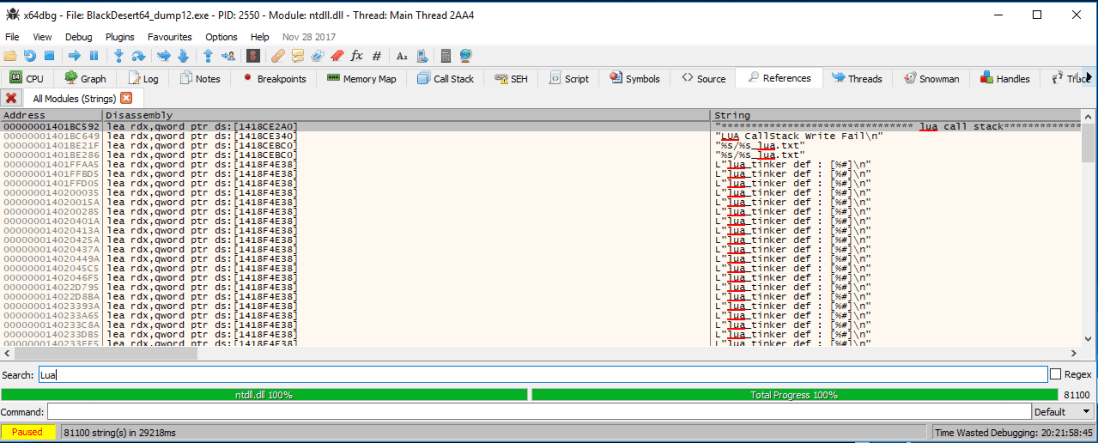
One of the greatest tool and the simplest to use in any sort of static reverse engineering is the string enumeration. I will be using x64dbg today as my debugger and disassembler. After loading up the binary and simply search for All String in all modules will result in a string dump of the entire binary. First step is to filter for any “Lua” string in the binary.
Strings including “Lua” in the binary“
One of the most recurring string is L"lua_tinker def : [%#]\n" . The L in the front signify that this is a wide string but overall it does not tell us much. Until we do a simple google search for “lua_tinker def”.
Oh? a Github?LUA to C++ Binding Library, exactly what we are looking for
At this point, we can verify that this is the source code that the game uses. I have no clue why it is online, or if this is the original creator but the source code is available to us.
Lua tinker’s source code
If you know any thing about lua programming, there are a few functions that will first pop up. These are dostring or dofile. Here is the description of the function from the lua’s website:
dofile (filename)
This function receives a file name, opens it and executes its contents as a Lua chunk, or as pre-compiled chunks. When called without arguments, it executes the contents of the standard input. It returns 1 if there are no errors, nil otherwise. It issues an error when called with a non string argument.
dostring (string)
This function executes a given string as a Lua chunk. It returns 1 if there are no errors, nil otherwise.
Basically, these are the two functions that will give us the ability to execute code as well as what the game is using to execute lua code. Let’s look for that in the lua tinker’s source code.
All we need
This is exactly all we need to know. DoString is actually returning dobuffer. Do buffer takes in three arguments, Lua_State *, const char * and size_t. Reading up the documentation, we will learn that Lua_State * is a pointer to the lua’s stack environment set up. It is required on all lua’s function and we will need it to execute functions inside the correct environment that will affect the game. const char* is a char pointer the ascii text that we want to execute, ie. “dosomething()”. Lastly, size_t is just an unsigned integer which we learned from the screenshot is just the .size() function applied on the text you want to execute, basically the length of the executing string.
Lastly, we also see an ascii text being shown which says “lua_tinker::dobuffer()”. What if…we search for this in the string dump?
One match, found it!disassembly of the function
This get decompile by ida into:
Wait…a sec… That looks exactly like
Let’s do some renaming…
Almost, perfect match.
It looks like we found our dostring/dobuffer! The rest is to hook it, extract the Lua_State pointer, store it for future use and then call the function whenever we need to execute something.





 Zer0C00lSecurity